Daily work
Manage subtasks from the parent
Add, complete and remove subtasks while keeping the parent open.
Subtasks divide a task into smaller work. Open the parent and use Subtasks; the count and progress refresh after each change. Controls follow your current authority on each item.
Add and finish work
Choose Add subtask…, or the panel's + icon, and enter a title. Press Enter to create it; the row stays ready and focused for another. Esc cancels; leaving an empty row closes it.
The new subtask inherits the parent's projects, sections and visibility. Assignment and dates start empty. Use the row's inline controls or open its detail to set them.
Use a subtask's completion checkbox without leaving the parent. If completion is unavailable, read its permission or dependency explanation.
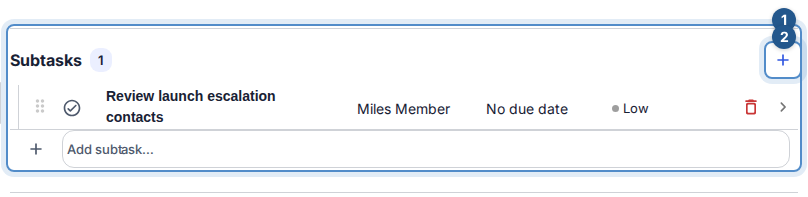
The parent's Subtasks panel keeps completion, reorder and delete controls beside each subtask and an inline add row below.
Remove a subtask
Choose the row's Delete subtask trash icon, or focus the row and press Delete. Review the named confirmation, then choose Delete. Its own nested subtasks are kept; deleting the selected item does not delete them. The parent stays open, its count and progress refresh, and focus returns to the next row or the add row.
Opening a child detail and closing it returns to the same parent, preserving its scroll and open panels. Deleting the child from its own detail also returns to the parent. If you opened the child directly and its parent is deleted or unavailable to you, deletion returns to the task list. If your delete permission changes while confirmation is open, its explanation updates and deletion becomes unavailable.