Troubleshooting
What works when I am offline?
Use permitted recent references and reconnect for current details or editing.
Offline mode is a limited reference view, not a complete copy of your workspace. It does not queue edits, comments, uploads, or read-state changes for later submission.
Read the offline state
When the connection is lost, read Offline recent views and its status message. Offline, showing what you last saw. These saved references are read-only. means an approved snapshot is available.
Check Last loaded on each view. References can be stale and are kept for at most one hour, with a bounded number of entries per view.
Use Clear offline data if you want to remove those local references.
Reconnect and wait for account, access, and workspace policy to be checked again. Open the live page for current details and editing.
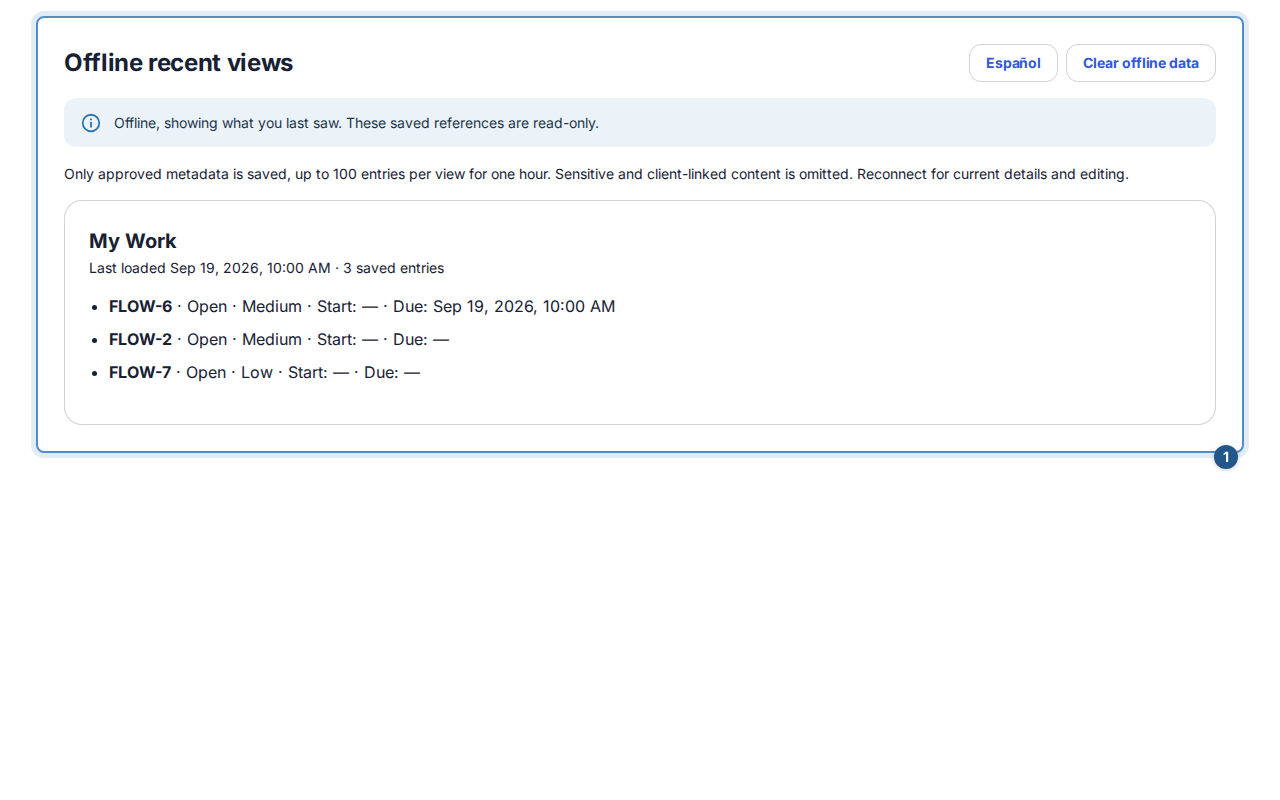
What is included
When the workspace permits it and the internal session is eligible, previously loaded views can retain approved work references, dates, states, priorities, project references/counts, and generic Inbox categories/read states. Names, titles, descriptions, comments, files, and client-linked content are excluded. The service worker does not cache private API responses.
Client and support sessions do not receive offline work snapshots. An Owner's permission does not make all workspace content available offline. A cold reload without a valid same-session snapshot shows the offline unavailable state.
No saved views or an interrupted edit
You are offline. No approved saved views are available for this session and workspace. Reconnect to load Flow. can be expected when caching is disabled, the snapshot expired, the session changed, or no eligible view was loaded. It does not mean the server deleted your work.
An editor already open during connection loss can remain in the tab, but no offline write is promised. Reconnect and review its current state before sending. Browser reload or closing the tab can lose unsent local text. For an uncertain earlier save, check the live result before retrying. Ask the workspace Owner about the offline policy rather than trying to bypass it.
Hide for now and Show my checklist check your saved preference if the connection loses the save response. A confirmed preference takes effect without a warning; if it cannot be confirmed, use the existing control to try again.