Troubleshooting
A request failed and shows a reference ID
Copy the request reference, check the result, and report a safe reproduction.
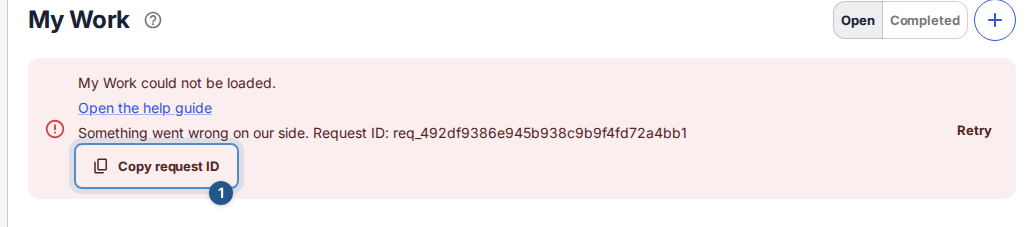
An error reference helps support locate the failed request without asking you to send the contents of your work. In Flow the reference is labelled Request ID.
Capture the useful details
Read the error beside the action or in the notification. Note what you were trying to do and the approximate time, including timezone.
If Request ID is present, choose Copy request ID. Wait for Request ID copied.. If clipboard access fails, select and copy the displayed value manually.
Preserve any unsent draft in the open editor. Check the current resource or list before repeating a create, send, or payment-like external action: a lost response can leave the result uncertain.
Use the page's recovery action. Retry can repeat a failed read or recover an existing request; a conflict asks you to reload and review the current version. Follow that specific message rather than opening several tabs and submitting repeatedly.
Match the error to the next step
- Offline or network failure: reconnect and check the current result. Some errors have no server-generated reference.
- Validation: correct the highlighted field, then submit once.
- Changed elsewhere: reload the latest state and review it before applying your change again.
- Permission or unavailable: check your account/workspace and ask the administrator about access. A request ID does not grant access.
- Server error: if a safe retry fails, contact support with the reference and steps.
For inline edits in work lists, Flow checks the affected item if the save response is lost. When the saved values match your edit, the normal success message appears. Otherwise, the translated save warning offers Retry for the same change. HTTP validation and conflict messages keep their specific recovery actions.
What to send
Send the reference, time, browser/device, page name, action, and expected versus actual result. Use a synthetic example where possible. Do not include passwords, cookies, tokens, MFA codes, signed download links, ticket text, or attachments. If no reference is shown, say so; do not invent one. Support can ask for additional safe details if necessary.