Files
Upload a file and check its scan state
Attach files to the right audience and recover uploads that are not ready.
Attach a file to the work or conversation it explains. Flow uploads the bytes, scans them, and checks the attachment audience before making them available to other readers.
Before you start
You need access to active work and permission to upload in the chosen context. Public ticket uploads can be restricted by your role even when internal uploads are allowed. Check the workspace's size and file-type policy before choosing a large or unusual file.
Upload in context
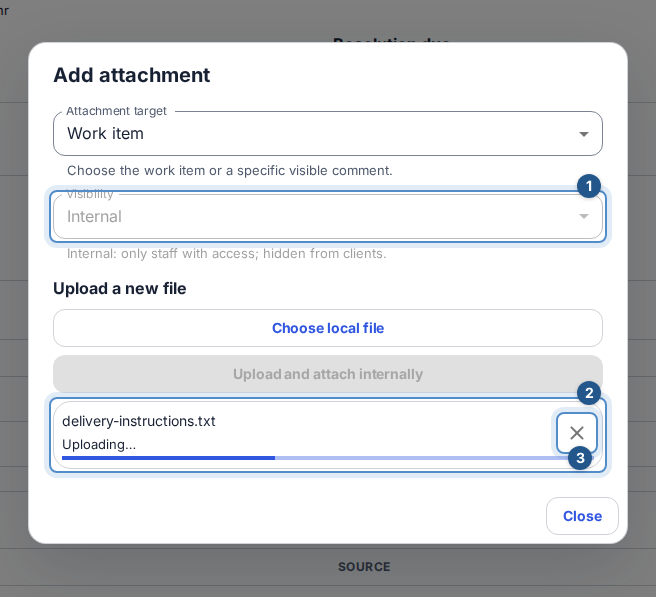
Open the task or ticket, go to Attachments, and choose +. In the dialog, check the target and choose the intended visibility before selecting files. Internal files stay internal; public files still require access to the parent work.
Select Choose local file and confirm Upload and attach. Dropping files onto the panel opens the same upload step. You may choose several files; each gets its own progress and recovery controls.
Wait for each file's upload, scan, and attachment result. A direct attachment is published after a clean scan. In a comment composer, a clean draft file remains private to you until you send the comment.
Check the filename, visibility, version, and scan state in Attachments. Use the named download action when it is enabled. Files provides a searchable workspace list, but Create file metadata alone does not upload bytes from your device.
Understand the states
A file must pass scanning before download
- Uploaded bytes→Pending scan
- Pending scan→Clean
- Pending scan→Failed or unknown
- Pending scan→Infected or quarantined
- Clean→Download with current permission
- Failed or unknown→Authorized retry
- Authorized retry→Pending scan
- Infected or quarantined→Upload a safe replacement
Pending means you must wait. Clean permits download only if you still have access. Failed or an unknown state is not a clean result. Infected and Quarantined block download; changing the filename or audience does not clear them.
Recover a file
Use the queue's Retry for a recoverable failure, or Remove to cancel an unfinished upload. If scanning takes too long, the queue offers explicit recovery rather than waiting forever. Where Retry scan is offered, you need current file mutation authority; it is not a quarantine bypass. Upload a safe replacement for infected content.
If an attachment is already published, removing a draft queue entry is not a way to delete it. If the audience, ticket, workspace, or your permissions change during upload, review the cancellation notice and choose files again in the correct context. For a denied download, reload the parent work to verify current access instead of reusing an old download link.