Troubleshooting
Browser notifications are not appearing
Check site permission, account registration, and workspace preferences separately.
Browser push needs three things: permission from the browser, a current registration for this account/session, and an eligible workspace event. Turning on one of them does not turn on the others.
Check this browser
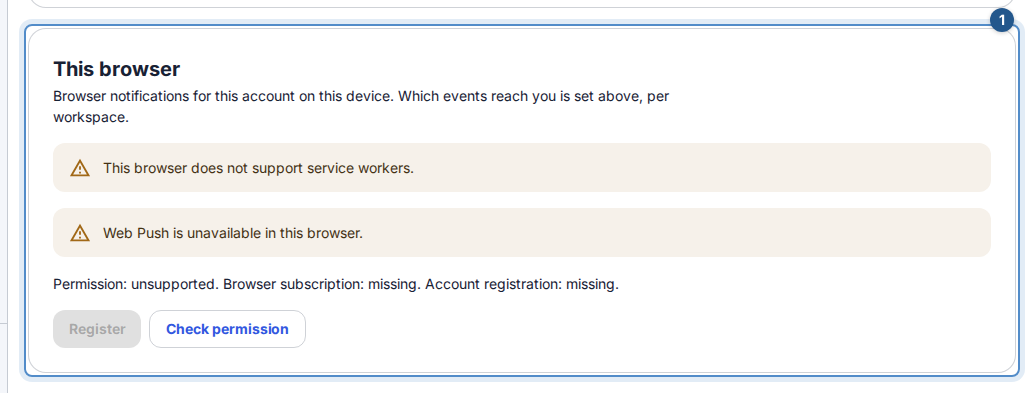
Open Profile → Notifications → This browser while online. Wait for the browser and account checks to finish.
Choose Check permission. Read the permission, browser, and account state separately.
If permission has not been decided, choose Allow and register, then allow the browser's prompt if you want notifications. If already allowed but unregistered, use Register.
If the state offers Verify, Repair, or Replace, follow that action and any confirmation. Check the resulting registration message; an allowed browser prompt alone does not confirm account registration.
Check workspace delivery
In Notification Preferences, choose Edit, check Push for this workspace for the intended workspace, and save permitted changes with Save notification preferences. Workspace policy may disable the channel. Quiet hours can delay eligible push; internal-note alerts never use push. Removing your access to the source work also prevents delivery. Notifications use generic text; opening one leads to authorized in-app content, not a preview of private work.
Blocked, unsupported, or unavailable
- If the site is blocked, change its notification permission in your browser's site settings, then return and choose Check permission. Flow cannot override browser or operating-system permission, focus mode, or notification settings.
- If the browser is unsupported, use a supported browser. On iPhone/iPad, web push requires a compatible installed Home Screen web app; use the installation guidance shown by Flow.
- If notifications are not enabled in this environment, ask the workspace administrator or support. Repeated registration cannot enable the service.
- While offline, device changes pause and are not retried automatically. Reconnect and review the state before trying again.
Remove this browser removes the device registration after confirmation. Disabling workspace Push only stops that workspace's delivery; it does not remove the browser. If the session changed, review Profile → Sessions and revoke sessions you no longer trust.