Tickets and clients
Send a reply the client can read
Deliberately select the public audience before replying or attaching a file.
Send a public reply when you need information from the requester or want to explain a solution. Public means visible to people who can access this ticket, including its authorized clients; it does not publish the conversation on the internet.
Before you start
You need current public-comment permission on the ticket. An internal-only ticket participation policy can remove public reply and public file actions even if your role can comment on tasks. Public attachments need their own upload authority.
Reply with the right audience
Open the ticket and read the latest conversation. Check that you are replying to the correct request and organization.
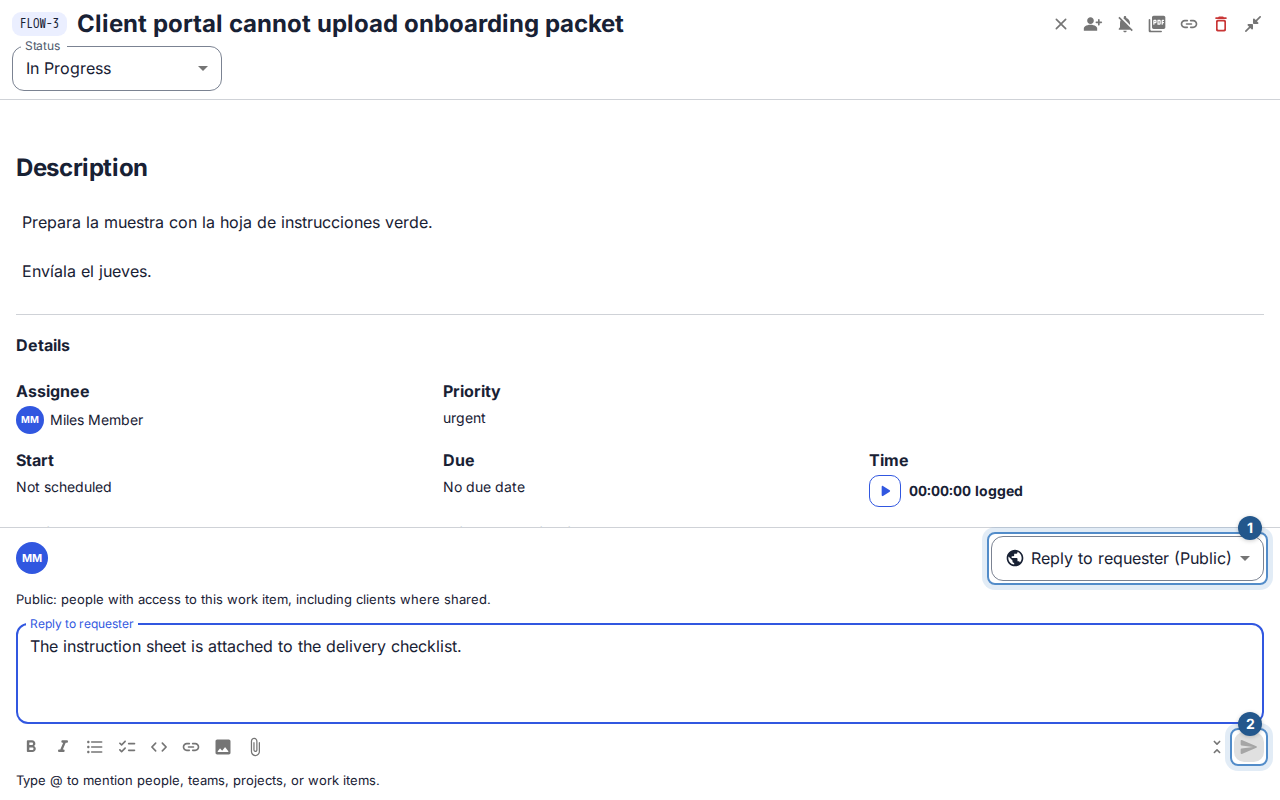
Expand the composer. Fresh staff ticket comments start as Internal note when that capability exists. In Visibility, deliberately choose Reply to requester (Public).
Write the reply after choosing the audience. If you changed from an internal draft, review the notice and compose the public message separately; do not assume private text or queued files carried over safely.
If needed, choose Add attachment and wait for each file to finish uploading and scanning. Review the public audience again. A file in your unsent draft is not yet a published attachment.
Select Send reply to requester. Wait for the sent confirmation and check that the reply appears in the conversation. The next staff ticket comment returns to the internal default.
What happens next
Authorized clients can read the reply in their portal. Notifications follow current access and notification preferences; sending a reply is not proof that an email reached a mailbox. If the SLA uses first public internal comment as its response event, this qualifying first reply meets that target once. Otherwise, follow the policy's state-change rule.
If sending fails
Keep the draft and read the error. Remove or retry a failed upload through its queue controls. After an uncertain network result, check the conversation before sending another copy. If public reply is no longer offered, ask an authorized colleague to reply; use an internal note for information meant only for the team.